
In our previous blog, we explored the gap between automated network infrastructure drawing capabilities and the real-world demands of your engineering teams. Your network information system has gone live and the data is present, but the auto-generated diagrams do not meet your operational requirements. They are either too simple and do not contain all the necessary information, for example, they are only single-line diagrams with no detailed view provided at the fibre or port level, or they are too cluttered and hard to use.
Cluttered auto-generated diagram
The search for usability
You need those diagrams to be usable to operate the network effectively. To resolve this, you might ask your network information system vendor for an improved solution. You show them how your manually drawn schematic and splice diagrams looked in the past and ask them to fine-tune their diagramming tool to generate similar quality automatically.
However, you may be unaware that this is a significant algorithmic challenge. It may require years of focused software development to convert machine-readable database records into human-readable visuals at a quality level that can compete with what skilled technicians produce. You wait for your vendor to improve the tool, investing both time and money. Yet, the task is very demanding, and the auto-generated results often remain disappointing in the end.
The manual workaround
What are the other alternatives? One option is to open the editing toolbar found in the network information system schematics window and start manually improving the auto-generated schematics to make them comprehensible.
As you do this, you slowly grasp the reality of your situation. You may have spent millions on digital transformation, yet you must now manually straighten lines and move graphics so they do not overlap on an auto-generated diagram.
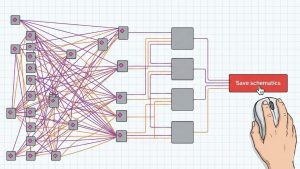
After concentrated effort, often under time pressure to connect a new business customer or to resolve a network problem, the initial auto-generated schematic is finally fixed. It looks visually clear and provides the insight you require. To save this manual effort for the next time, you hit the "Save schematics" button.
Why "Save schematics" is the most dangerous button
The job is done, but you recognize that the very problem you sought to eliminate with the digital transformation has been reintroduced. Why is that?
As time passes, the network changes. A maintenance team replaces a cable, or a new splitter is added. These changes are instantly updated in the central database of your network information system. However, a week later, when you open that visually improved schematic you spent hours fixing, you instantly realize it is obsolete. It does not reflect the changes made in the system in the meantime. The saved schematic stored in a static file and the live central database are not linked. You now face two options, and neither is optimal:
- Option A: Run the auto-generation algorithm again to produce a diagram that includes all the data changes introduced in the central database. The diagram will be updated with the new information, but all the manual formatting effort you put into it for increased visual clarity will be lost since the algorithm is most probably not capable of considering your past manual corrections. If you decide to regenerate the diagram with the latest data updates from the central database, the probability is high that you are back to point zero and must start redrawing your schematic diagram again.
- Option B: You keep the existing manual drawing. It looks good, but it does not reflect reality. It is outdated and dangerous to use because it does not represent the actual state of the field.
Not one, but several sources of truth
Now the core problem is clear. Your network information system, which you thought would introduce a single source of truth, has inadvertently created a second source of truth: the static, saved schematic drawing which we call shadow documentation. The moment you hit "Save schematics" on a manually improved layout, you broke the link to the live database.
As it turns out, partial automation is not automation. If the system does 80% of the work but leaves the last 20% (the crucial visual arrangement) to a human, it forces you to save a static file. Despite the investment in a new system, you are back to square one: manual effort and multiple sources of truth that need constant synchronization.
The retreat to legacy tools
You might even consider a more drastic approach than manually improving automated schematics.
Ideally, troubleshooting, provisioning, or planning teams could use automated tools directly if the generated schematics were immediately functional. However, they are currently required to manually adjust diagrams before use. This task is often viewed as a burden, as these teams are not experts in drafting. They do not have the specialized skills of the documentation technicians who previously generated these schematics.
Consequently, you may consider returning to a fully manual workflow utilizing CAD or Visio applications, as was the practice prior to the transformation project. This allows for the reassignment of dedicated technicians who possess the specific drafting proficiency required to manage these tasks.
But with that decision, you have not solved the "two sources of truth" problem; you might even have exacerbated it. You now face a double financial burden: one has to pay for both the network information system licenses and the CAD application licenses. Additionally, technicians must be skilled in both environments, requiring more training and slower onboarding.
By introducing a modern information system, you thought you would erase all your worries related to manual work and disconnected data sources. But because of this specific limitation, the inability to generate directly usable schematic and splice diagrams without human intervention, the goal of your digital journey has not been met. How do you finally break the cycle of manual work and desynchronized data sources? We will discuss the solution in our next post.